
Are you struggling to get your plastic parts to match that perfect Pantone chip? This frustrating challenge can cause project delays and client dissatisfaction. But what if you could nail the exact color every single time, ensuring your brand’s integrity and speeding up your time to market?
Mastering Pantone color matching in plastic injection molding requires a systematic approach. Success depends on selecting the right plastic resin, using a high-quality masterbatch with a proper let-down ratio, and precisely controlling processing parameters like temperature, pressure, and cycle time. Communicating clear specifications and evaluating samples under controlled lighting are also essential steps to achieve consistent, accurate color.

Achieving that perfect color is a science, not just an art. It’s where my team and I at CavityMold have spent years refining our process. We’ve seen firsthand how a small oversight can lead to a big color mismatch. The good news is that these problems are almost always preventable. It comes down to understanding the key variables and controlling them with expert precision. Let’s break down the common hurdles and the practical solutions you can implement on your next project.
Why Is Achieving The Perfect Pantone Color So Hard In Plastics?
Ever approved a color sample in the factory, only to find it looks completely different in your office or a retail store? This common headache can disrupt your entire production schedule. Let’s pinpoint exactly why achieving consistent Pantone colors in plastic is such a difficult task to manage.
Achieving a perfect Pantone match is hard because color perception is influenced by many physical factors. The base resin’s natural tint, the part’s surface texture and gloss, wall thickness, and the viewing light source all alter how the color appears. This phenomenon, where colors match under one light but not another, is called metamerism and is a primary challenge.
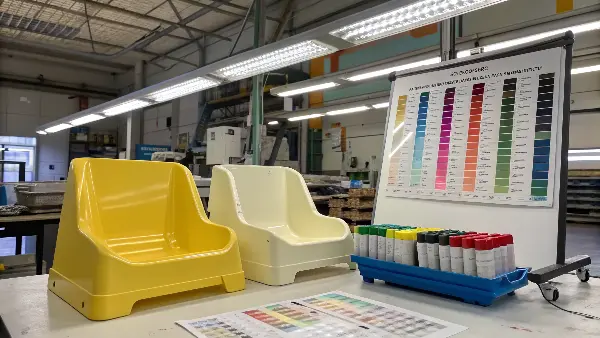
I remember a project for a client in the consumer electronics space. They had specified a very particular shade of cool gray for a new device’s housing. We produced the first-off-tool samples, and under our factory’s fluorescent lights, they were a perfect match. I was proud and shipped them off for approval. The client, viewing them under the natural daylight of his office in Australia, called me immediately. He said the parts looked beige, not gray. This was my first real lesson in the power of metamerism. It’s a tricky beast, but once you understand it and the other variables at play, you can tame it.
The Metamerism Trap
Metamerism is probably the biggest and most misunderstood challenge in color matching. It happens when two colors appear to be the same under one lighting condition but look different when the light source changes. This is because the pigments in your masterbatch and the Pantone ink on the reference chip reflect light differently.
- Factory Lighting: Often cool-white fluorescents (like D65).
- Office/Home Lighting: Typically warm incandescents (like Light Source A).
- Retail Store Lighting: Can be a mix of LEDs, halogens, or specialized fluorescents.
The only way to combat this is to use a standardized light box with multiple light sources (D65, A, CWF, etc.) for every color evaluation, ensuring both you and your client are looking at the part under the same conditions.
The Unseen Influence of Base Resin
You can’t add color to something without considering its starting color. Plastic resins are not perfectly clear or neutral.
- ABS often has a slightly yellowish or creamy tint.
- Polypropylene (PP) is naturally milky or hazy.
- Polycarbonate (PC) is one of the clearest, but even it can have a subtle blue or gray cast.
This base color will mix with your colorant, shifting the final hue. A good color specialist will compensate for this, but you need to finalize your material choice before you start the color matching process. Changing it later means starting over.
Surface, Thickness, and Gloss Effects
The physical properties of the part itself play a huge role in color perception.
| Feature | Effect on Color Perception |
|---|---|
| High-Gloss Finish | Reflects more light directly, making the color appear lighter and more saturated. |
| Matte/Textured Finish | Scatters light, making the color appear darker and less saturated. A heavy texture can significantly mute the color. |
| Wall Thickness | Thicker sections can appear darker and more opaque. Thin sections may look lighter or more translucent. |
We always match the color on a plaque that has the same gloss, texture, and a similar thickness to the final part. Using a standard, smooth color chip to approve a color for a heavily textured part is a recipe for failure.
How Does Material Choice Affect The Final Pantone Color?
You’ve chosen a Pantone color, but did you consider how your plastic resin will affect it? Picking a material after the color is set can lead to costly remakes and delays. Let’s ensure your material choice and your color specifications work together perfectly from day one.
Your choice of plastic resin is critical. The resin’s natural color, clarity, and heat stability directly impact the final color. Amorphous plastics like PC and ABS are transparent, providing a clearer canvas for colorants. Crystalline plastics like PP and Nylon are naturally opaque, which can mute colors. Additives like glass fibers or flame retardants also alter the appearance and must be accounted for.

Years ago, we were working on a set of kitchen utensils for a European brand. The client loved a vibrant, almost electric, yellow Pantone color. They initially specified the material as Polypropylene (PP) for its cost and chemical resistance. However, PP’s naturally milky, crystalline structure made it impossible to achieve the requested vibrancy. The yellow looked dull and washed out. After a few failed trials, I had to have a tough conversation with the client’s project manager, Alex. I explained the issue and proposed switching to ABS. It was a bit more expensive, but its amorphous, clearer base allowed the yellow to pop exactly as they wanted. It was a valuable lesson for us both: material and color must be decided together.
Amorphous vs. Crystalline Resins
The molecular structure of the plastic is a foundational factor in color matching. This is one of the first things we discuss with a client.
-
Amorphous Resins (e.g., PC, ABS, PS, Acrylic): These have a random, jumbled molecular structure. This allows light to pass through more easily, making them transparent. They are an excellent base for achieving bright, clear, and vibrant colors. Think of them as a clean canvas.
-
Crystalline Resins (e.g., PP, PE, Nylon, POM): These have an orderly, crystal-like molecular structure that scatters light, making them naturally translucent or opaque. This milkiness can make it difficult to achieve deep saturation or high vibrancy. Colors in these materials often appear softer or more pastel.
The Impact of Fillers and Additives
Base resin is rarely used alone. Most engineering applications require additives for strength, flame resistance, or UV protection, and these dramatically affect color.
- Glass Fibers (GF): Adding glass fibers for strength (e.g., in PA6-GF30) will almost always lighten the color and give it a "frosty" or swirled appearance. Black might look more like a charcoal gray.
- Flame Retardants (FR): Many FR additives have a yellowish or off-white tint, which will contaminate the color base. This needs to be compensated for in the masterbatch formulation.
- UV Stabilizers: While essential for outdoor products, some UV packages can slightly alter the initial color and, more importantly, how the color ages over time.
You must formulate the color match using the exact grade of material, with all additives included.
Heat Stability and Processing Temperature
Every plastic has an ideal processing temperature range. Colorants also have a temperature at which they begin to break down or burn.
| Resin | Typical Melt Temp (°C / °F) | Color Matching Considerations |
|---|---|---|
| Polypropylene (PP) | 200-250 °C / 392-482 °F | Lower temp, compatible with most organic pigments. |
| ABS | 210-240 °C / 410-464 °F | Good for a wide range of colorants. |
| Polycarbonate (PC) | 280-320 °C / 536-608 °F | High temp requires more expensive, heat-stable pigments. |
| Nylon (PA66) | 260-290 °C / 500-554 °F | High temp and hygroscopic (absorbs moisture), which can affect processing and color. |
If you choose a colorant that isn’t stable at your resin’s processing temperature, you will get color shifts from one shot to the next. The pigment might even degrade entirely, leading to streaks or black specks in the final part. This is why you can’t just pick any "red" masterbatch for a high-temperature material like PC.
What Are The Best Practices For Selecting and Using Masterbatch?
Your color masterbatch is the key ingredient, but not all are created equal. Using a poor-quality or improperly specified masterbatch can ruin color consistency and cause major production headaches. Let’s make sure you get this crucial step right from the start.
For best results, source your masterbatch from a reputable supplier who can formulate it for your specific resin, additives, and processing conditions. Provide the supplier with a physical Pantone standard, not just a number. Specify the exact let-down ratio (LDR) to be used in production and ensure it’s carefully measured for every machine run.
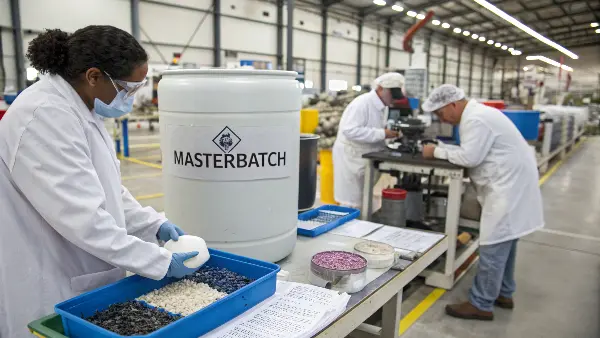
I have a rule in my workshop: "trust, but verify." Early in my career, we got a large order for blue bins. The masterbatch arrived from a new supplier, and on paper, everything looked fine. The operator mixed it at the specified 4% let-down ratio. The first few hundred parts looked great. But halfway through the run, the color started to look lighter, more washed out. We discovered the masterbatch pellets were inconsistent in size and density, causing the dosing equipment to feed it unevenly. We had to scrap half the run. Now, we always test a new batch of masterbatch thoroughly before committing to a full production run.
Choosing a Quality Supplier
This is not the place to cut corners. A cheap masterbatch can be the most expensive mistake you make. A high-quality supplier does more than just sell you pigments.
- They ask the right questions: They’ll want to know your resin grade, all additives, processing temperatures, wall thickness, and final application.
- They provide technical data: You should get a spec sheet that confirms the pigments used are suitable for your application (e.g., food-grade, heat-stable, lightfast).
- They offer formulation expertise: They can adjust the formulation to counteract the base resin color or account for metamerism under specific light sources.
Defining The Let-Down Ratio (LDR)
The let-down ratio is the percentage of masterbatch mixed with the natural resin. A typical LDR is between 1% and 5%.
- 4% LDR (4:100): 4 parts masterbatch to 100 parts natural resin.
- 1% LDR (1:100): 1 part masterbatch to 100 parts natural resin.
It’s critical that the color is matched and approved at the exact LDR that will be used in mass production. An LDR of 2% will produce a different color than an LDR of 3% using the same masterbatch. This specification must be clearly communicated to the molding floor and controlled precisely, usually with automatic dosing equipment.
The Role of The Carrier Resin
Masterbatch isn’t pure pigment. The pigment is dispersed in a carrier resin to make the pellets.
| Aspect | Importance in Color Matching |
|---|---|
| Compatibility | The carrier resin must be compatible with the base resin. Using a PP carrier in a PC base will cause defects. The best practice is to use the same resin for the carrier as the base material. |
| Melt Flow Index (MFI) | The MFI of the carrier should be equal to or higher than the base resin. This ensures the masterbatch melts quickly and disperses evenly throughout the barrel for a uniform color. |
| Quality of Dispersion | A good masterbatch has pigments that are finely and evenly dispersed in the carrier. Poor dispersion leads to streaks, swirls, or clumps of color in the final part. |
Never hesitate to ask your supplier what carrier resin they are using. It’s a fundamental detail that has a massive impact on both the color and the structural integrity of your part.
How Do Manufacturing Variables Wreck Your Color Consistency?
You’ve selected the perfect material and a high-quality masterbatch. Yet, your parts are still coming out in different shades from one run to the next. What’s going on? The injection molding process itself is a major source of color variation.
Inconsistent processing parameters are a primary cause of color shifts. Variations in melt temperature, residence time in the barrel, injection speed, and back pressure can all alter the final color. A higher temperature or longer residence time can burn sensitive pigments, while changes in pressure and speed can affect the part’s gloss and surface, thus changing color perception.

We once had a difficult project involving a translucent red polycarbonate part. The color was extremely sensitive. The day shift produced perfect parts, but the night shift parts consistently came out slightly darker, almost brownish. We checked the material, the masterbatch, the dryers—everything. It turned out the night shift operator, trying to be efficient, would pause the machine for longer periods during his breaks without purging the barrel. This increased the residence time of the material in the hot barrel, and the heat-sensitive red pigment was literally getting "cooked" a little longer, causing the color to shift. It was a perfect example of how a small process deviation can have a big cosmetic impact.
The Critical Role of Temperature
Melt temperature is arguably the most influential processing variable on color.
- Too Hot: If the temperature is too high or the material sits in the barrel for too long (long residence time), the heat can degrade the pigments and the polymer itself. This often results in a yellowish or brownish tint or a darker shade overall.
- Too Cold: If the temperature is too low, the masterbatch may not melt and mix properly. This leads to streaks, swirls, or a generally weak color. It can also result in a lower gloss finish, which makes the color appear duller.
Establishing a stable, optimized process window for temperature is key.
Pressure, Speed, and Gloss
Injection pressure and speed don’t typically change the pigment itself, but they have a massive effect on the surface of the part, which changes how we perceive its color.
- Injection Speed: A faster injection speed often increases the gloss on the part’s surface. Higher gloss makes a color look lighter and more saturated.
- Hold Pressure: Packing pressure affects how well the plastic replicates the mold surface. Higher pressure can lead to a higher gloss finish, again making the color seem lighter. Inconsistent pressure leads to inconsistent gloss and, therefore, inconsistent color.
This is why you can’t just look at the color; you must also evaluate the gloss level against a master sample.
Key Processing Variables to Control
To achieve true color consistency from the first part to the millionth, you must lock down your process.
| Parameter | Impact on Color if Not Controlled |
|---|---|
| Melt Temperature | The most direct impact. Can burn or alter pigments if too high or unstable. |
| Residence Time | How long the plastic is at melt temperature. Longer times can degrade color, especially for heat-sensitive pigments. |
| Back Pressure | Affects the quality of mixing in the screw. Too low can lead to poor dispersion (streaks); too high can increase shear heat. |
| Injection Speed | Primarily affects surface gloss. Inconsistent speed leads to inconsistent gloss and perceived color. |
| Mold Temperature | Also affects surface gloss and can influence the crystallinity of some materials, which subtly changes color. |
| Moisture Content | For hygroscopic resins like Nylon or PC, improper drying can cause splay marks and affect the final gloss and color. |
A documented and validated process sheet is non-negotiable for any color-critical project. Every operator, on every shift, must adhere to it without deviation.
Conclusion
Mastering Pantone color matching in plastic molding is a process of careful control. It’s about aligning material science, precise manufacturing, and clear communication. By focusing on the details—from resin and masterbatch selection to locking in your processing parameters—you can eliminate inconsistencies and deliver perfect color every time.